
The Role of IT Support in Business Continuity
IT support is the operational backbone of any business continuity strategy, responsible for keeping critical technology services available and recoverable when disruptions strike. Business leaders and IT managers who treat IT support as a reactive help desk miss its true function. The role of IT support in business continuity spans proactive risk assessment, incident response, disaster recovery execution, and governance alignment. Standards like ISO 22301 and NIST SP 800-34 define the frameworks that mature IT teams use to integrate these responsibilities into a single, unified resilience model. Getting this right separates organizations that recover in hours from those that lose days of operations.

How does IT support contribute to business continuity planning?
IT support defines which systems your business cannot afford to lose. Before any disruption occurs, IT teams conduct business impact analyses to identify critical applications, data stores, and infrastructure dependencies. This work directly informs recovery objectives like Recovery Time Objective (RTO) and Recovery Point Objective (RPO), which set the maximum acceptable downtime and data loss for each system. Without these numbers, recovery efforts become guesswork.
Dependency mapping is one of the most undervalued practices in this phase. A single application may rely on Active Directory, DNS, a database cluster, and a third-party API. IT support teams that map these relationships before an incident know exactly what to restore first and in what order. Teams that skip this step often restore servers successfully but find that users still cannot work because foundational services like DNS remain unavailable.
Risk assessment in this context covers more than hardware failure. IT support must account for ransomware attacks, third-party outages, cloud provider incidents, and human error. Each risk category carries a different probability and a different recovery path. Documenting these scenarios in a formal risk register gives business leaders the visibility they need to prioritize investment in resilience.
Identify all critical applications, databases, and infrastructure components
Map dependencies between systems, including identity services and DNS
Define RTO and RPO for each critical service in collaboration with business unit owners
Document risk scenarios covering cyber incidents, vendor failures, and hardware faults
Review and update the risk register at least annually or after any major infrastructure change
Pro Tip: Involve department heads in the business impact analysis, not just IT staff. Finance, operations, and customer service teams know which system outages cost the most in real terms.
What are the key IT support practices for incident response?
Support specialists act as first responders in incident triage, identifying scope, escalating appropriately, and protecting productivity from the first alert. A structured incident response workflow removes ambiguity under pressure. Every team member knows their role, and every incident follows a defined path from detection to resolution.
Communication is the most overlooked element of incident response. Keeping users informed during outages reduces misinformation and prevents people from creating ineffective workarounds that complicate recovery. IT support teams should define message approval workflows and maintain off-environment contact paths, such as a secondary email system or a group messaging app, so communication continues even when primary systems are down.
Runbooks and knowledge bases accelerate resolution significantly. A runbook documents the exact steps to diagnose and resolve a known failure type, including which vendor to call and in what order to restart services. Teams that maintain current runbooks resolve incidents faster than teams relying on institutional memory alone. The difference becomes critical at 2:00 AM when the engineer who built the system is unavailable.
Detect and log the incident with timestamp, affected systems, and initial severity rating
Triage to determine scope and business impact using predefined criteria
Notify stakeholders through approved communication channels with a status update
Escalate to the appropriate technical team or vendor based on incident type
Execute resolution steps from the relevant runbook or documented procedure
Conduct a post-incident review to update documentation and prevent recurrence
Pro Tip: Test your off-environment communication path quarterly. Most teams discover it is broken only when they need it most.
How does IT support manage disaster recovery to restore operations?
Business continuity and disaster recovery are distinct but complementary disciplines. Business continuity covers people, processes, and facilities. Disaster recovery focuses narrowly on restoring IT systems after an outage. IT support sits at the center of disaster recovery execution, translating recovery plans into technical action.
Recovery strategies range in cost and complexity. The four most common approaches are:
Backup and restore: Data is backed up to a secondary location and restored after failure. This is the lowest-cost option but carries the longest recovery time.
Warm standby: A secondary environment runs in a reduced state and can be activated within hours. This balances cost and recovery speed for most mid-size organizations.
Failover sites: A fully mirrored environment switches over automatically or with minimal manual intervention. This suits organizations with near-zero RTO requirements.
Cloud-based recovery: Workloads replicate to a cloud provider and spin up on demand. Cloud migration strategies have made this option accessible to organizations that previously could not afford dedicated failover infrastructure.
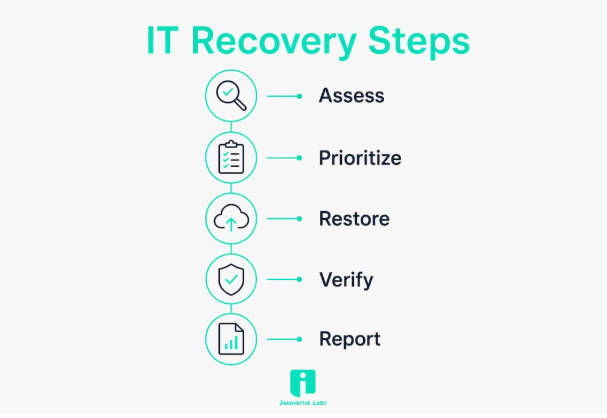
Testing is where most recovery plans fail. An IT recovery plan must include inventory of critical applications and data, clear recovery objectives, and procedures validated through cutover tests and simulation drills. A plan that has never been tested is a plan that will fail under real conditions. Mature IT teams run tabletop exercises, partial failover tests, and full cutover drills on a defined schedule, typically at least once per year.
Recovery runbooks are the operational core of this process. A well-built runbook specifies ordered restoration procedures covering dependencies like DNS and identity management, vendor contact details, and escalation paths. Mature continuity plans prioritize restoring foundational services like Active Directory and DNS first, because restoring servers without these services leaves users unable to authenticate or access anything.
What challenges affect IT support's continuity role in 2026?
The operating environment for IT support has grown significantly more complex. Hybrid cloud architectures, remote workforces, and multi-vendor ecosystems create dependencies that did not exist five years ago. Each dependency is a potential failure point that must appear in the risk register and the recovery runbook.
Ransomware is now the most disruptive threat to business continuity for most organizations. A ransomware attack does not just encrypt data. It can disable backup systems, corrupt recovery tools, and compromise identity infrastructure simultaneously. IT support teams must treat cybersecurity protocols as a direct component of continuity planning, not a separate workstream.
Governance and continuous improvement separate organizations that maintain effective continuity plans from those whose plans degrade over time. Operationalizing continuity requires embedding recovery planning into change management, asset management, vendor oversight, and cybersecurity protocols. When a new application is deployed or a vendor is replaced, the continuity plan must update automatically as part of the change process.
Hybrid cloud and multi-vendor environments increase dependency complexity and failure surface
Remote workforce models require continuity plans to cover VPN capacity, endpoint security, and home network failures
Regulatory compliance frameworks, including HIPAA for healthcare and SOC 2 for technology firms, mandate documented continuity and recovery procedures
ITIL and ITSM frameworks provide governance structures that keep continuity plans aligned with live infrastructure
IT infrastructure redundancy practices must account for cloud provider regional outages, not just on-premises hardware failure
A unified resilience governance model that integrates disaster recovery, IT service continuity, and business continuity under a single oversight body produces better outcomes than siloed plans managed by separate teams. Disaster recovery functions as a first-line operational engineering activity. Business continuity functions as a second-line oversight role. Unifying their reporting structure removes the gaps that cause failures during real incidents.
Key Takeaways
IT support's role in business continuity is only as strong as the planning, testing, and governance that back it up.
Why most continuity plans fail before the first real test
I have reviewed continuity plans at organizations that spent significant budget on backup infrastructure, failover sites, and monitoring tools. The plans looked thorough on paper. Then we ran a tabletop exercise, and within 20 minutes the team discovered that no one knew the vendor contact for their DNS provider, the off-environment communication path had not been tested in two years, and the runbook referenced a server that had been decommissioned.
The real problem is not a lack of investment. It is the gap between building recovery tooling and building end-to-end service usability. Restoring a server is not the same as restoring a working service. If users cannot authenticate, cannot access shared drives, and cannot reach their email, the business is still down regardless of server uptime metrics.
The fix is simpler than most teams expect. Embed continuity planning into your existing change management process. Every time a new system goes live or a vendor changes, the runbook updates as part of the same ticket. This keeps plans current without requiring a separate annual review cycle that everyone treats as a compliance checkbox.
How Innovative Labs supports your IT continuity strategy
Innovative Labs brings a decade of hands-on experience building and maintaining platforms that stay operational under pressure. The team integrates managed IT and cloud services with custom software development, so your continuity plan covers both the infrastructure layer and the applications your business depends on. Innovative Labs has delivered HIPAA-compliant environments for healthcare clients and high-availability platforms for fast-growth startups, with round-the-clock support that responds before outages become crises. If you want to see how this works in practice, the software development case studies show real results across industries. Reach out to discuss a continuity assessment tailored to your infrastructure.
FAQ
What is the role of IT support in business continuity?
IT support maintains and restores critical technology services during disruptions, covering risk assessment, incident response, and disaster recovery execution. Its function aligns with frameworks like ISO 22301 and NIST SP 800-34 to keep operations running within defined recovery objectives.
What is the difference between business continuity and disaster recovery?
Business continuity covers people, processes, and facilities, while disaster recovery focuses on restoring IT systems after an outage. Both are necessary and work best when governed under a unified resilience model.
How often should IT recovery plans be tested?
IT recovery plans should be tested at least once per year through a combination of tabletop exercises, partial failover tests, and full cutover drills. Plans that go untested degrade quickly as infrastructure changes outpace documentation.
What is a recovery runbook and why does it matter?
A recovery runbook documents the ordered steps to restore IT services after a failure, including dependencies, vendor contacts, and escalation paths. Teams with current runbooks resolve incidents faster and with fewer errors than teams relying on memory alone.
How does ransomware affect business continuity planning?
Ransomware can disable backup systems, corrupt recovery tools, and compromise identity infrastructure simultaneously, making it one of the most disruptive threats to continuity. IT support teams must integrate cybersecurity and continuity protocols into a single coordinated response plan.