
Cloud Support Operations Explained for IT Teams
Cloud support operations is defined as the coordinated management of cloud service delivery, incident response, security, and cost control across an organization's cloud infrastructure. For IT professionals and decision-makers, understanding cloud support operations explained in full means grasping four distinct layers: governance, foundation operations, application management, and security. These layers do not operate independently. Each depends on the others to keep cloud workloads running reliably, within budget, and in compliance with standards like HIPAA. Organizations that treat cloud support as a reactive help desk function consistently underperform those that build it as a proactive operating model.
What are the core components of cloud support operations?

Modern cloud operations consist of four coordinated layers, each requiring specific access permissions and defined responsibilities. Treating any one layer as optional creates gaps that compound into outages, compliance failures, or runaway costs. The Microsoft Azure Cloud Adoption Framework uses this four-layer model as its core organizational structure for cloud operations teams.
Governance sets the rules every other layer follows. It covers policy enforcement, role-based access controls, and regulatory compliance. Without governance, teams grant excessive permissions, drift from compliance baselines, and lose visibility into who changed what and when.
Foundation operations keeps the infrastructure healthy. This layer covers capacity planning, infrastructure monitoring, patch management, and automation of routine maintenance tasks. Teams that neglect foundation operations discover problems only after users report outages, which is always too late.
Application management focuses on the software running on top of the infrastructure. Performance monitoring, update cycles, and application-level alerting all belong here. A well-run application management layer catches degraded response times before they become full service failures.
Security is not a separate silo. It runs across all three other layers, covering identity management, access controls, vulnerability scanning, and threat detection. Cloud security shared responsibility frameworks make clear that the cloud provider secures the infrastructure, but the organization owns everything above it.
Pro Tip: Map each of your current IT tasks to one of these four layers. Any task that does not fit cleanly into a layer is either duplicated work or a gap in your operating model.
How do cloud support plans and service levels affect operations?
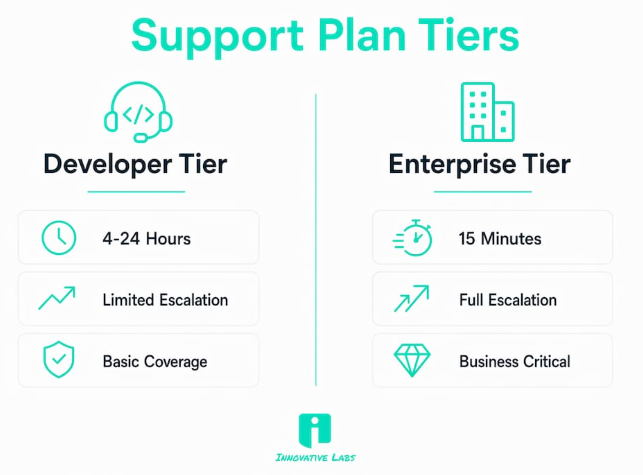
Support plan tiers directly determine how fast your team gets help when something breaks. Enterprise-grade support plans offer response times as fast as 15 minutes for critical outages. Lower-tier plans may take 4–24 hours to respond to non-urgent issues. That gap matters enormously when a production database goes offline at 2 a.m.
The difference between tiers goes beyond response time. Business-critical escalation paths are only available under enterprise-level plans. Developer and basic plans handle general questions and non-urgent configuration issues, but they do not provide the case severity classification or dedicated escalation channels that mission-critical workloads require.
Choosing the right tier requires matching your workload criticality to the plan's guarantees. Google Cloud support plan models recommend basic plans for learning environments and premium plans for production systems where downtime has direct revenue impact. AWS follows a similar logic, with its Business and Enterprise tiers adding proactive guidance and technical account management.
The table below shows how support tiers typically differ across key operational dimensions.
Pro Tip: Audit your workloads by revenue impact before selecting a support tier. A single production system with high revenue exposure justifies enterprise-tier costs on its own.
What roles and responsibilities define cloud support teams?
Cloud support operations teams are not a single job title. They are a structured set of roles with distinct but overlapping responsibilities. Understanding who owns what prevents the most common failure mode in cloud operations: everyone assumes someone else is watching.
The Cloud Operations Manager sits at the center of the model. This role bridges technical reliability and business context, managing incident response, monitoring, automation oversight, cost control, and compliance. The manager does not personally fix every issue. The manager ensures the right people are engaged, the right processes are followed, and the business understands the impact of technical decisions.
Support engineers and specialists handle the hands-on work. Their primary focus areas include:
Incident triage: Classifying incoming issues by severity and routing them to the correct team or vendor escalation path.
Identity and access troubleshooting: Resolving misconfigured roles, broken federation, and permission errors that block users from cloud resources.
Network diagnostics: Identifying routing failures, DNS misconfigurations, and connectivity issues between cloud services and on-premises systems.
Synchronization issues: Fixing directory sync failures between on-premises Active Directory and cloud identity providers, a common source of login failures.
Documentation: Recording issue symptoms, steps taken, and resolution details to prevent repeat escalations.
Cross-functional coordination across security, finance, engineering, and service desk teams is a core responsibility of the operations manager. Cost anomalies require finance context. Security incidents require security team involvement. Service desk teams need clear escalation paths. Without deliberate coordination, these handoffs break down under pressure.
"Cloud operations managers serve as liaisons between technical reliability and business impact, not as direct fixers of every issue." — ITU Online IT Training
The shift from traditional IT support to cloud-centric support is significant. Legacy IT support focused on physical hardware, on-site troubleshooting, and vendor hardware warranties. Cloud support operations focus on configuration, identity, networking layers, and API-driven infrastructure. The skills required are fundamentally different, and organizations that staff cloud teams with only traditional IT experience consistently struggle with escalation rates.
What are best practices for managing cloud support operations?
Proactive monitoring is the single most effective practice in cloud operations management. Teams that wait for users to report problems operate in permanent reaction mode. Teams that instrument their environments with alerting thresholds, anomaly detection, and automated health checks catch issues before they reach users.
Automation of routine tasks reduces manual work, creates consistency, and frees engineers to focus on complex problems. Patch deployment, backup verification, and resource scaling are all candidates for automation. Every manual process that runs on a schedule is a candidate for a script or a managed service.
Troubleshooting discipline separates good cloud support teams from reactive ones. Effective cloud troubleshooting follows a systematic process: identify symptoms, isolate variables, test one hypothesis at a time, and document results. Teams that skip documentation repeat the same investigations on the same issues, wasting hours that compound across months.
Common pitfalls to avoid in cloud service operations include:
Ignoring identity layer issues: Misconfigurations in identity, tenancy, and synchronization cause more tickets than application bugs. Invest in identity expertise early.
Skipping cost reviews: Cloud costs grow silently. Monthly cost reviews with finance and engineering prevent budget overruns that take quarters to reverse.
Treating security as a separate team's problem: The shared responsibility model means your team owns configuration security. Delegate it entirely and you own the breach.
Underinvesting in documentation: A team that does not document its environment cannot troubleshoot it efficiently. Documentation is an operational asset, not an administrative chore.
For organizations managing legacy software integration challenges, cloud support operations add another layer of complexity. Hybrid environments require teams to understand both cloud-native and on-premises behavior simultaneously.
Pro Tip: Build a runbook for every recurring incident type. A runbook converts a 90-minute investigation into a 10-minute resolution by giving engineers a tested path to follow.
Key Takeaways
Effective cloud support operations require a layered operating model, skilled roles with clear ownership, and support plans matched to workload criticality.
Cloud operations as a business function, not just a technical one
The framing I see most often in organizations is that cloud support is a cost center. That framing is wrong, and it leads to chronic underinvestment in the people and processes that keep revenue-generating systems running.
I have worked with organizations that treated cloud operations as a background function until a major incident hit. The pattern is consistent: the team is understaffed, monitoring is reactive, and the support plan tier does not match the criticality of the workloads it covers. When the outage happens, the cost of the incident dwarfs what a proper operations investment would have cost for an entire year.
The most important shift I have seen in mature cloud organizations is treating the Cloud Operations Manager role as a business liaison, not a senior technician. That person needs to speak the language of finance, compliance, and service delivery, not just infrastructure. When that role is filled correctly, cloud operations decisions get made with business context, not just technical preference.
How Innovative Labs supports your cloud operations
Innovative Labs brings a decade of hands-on experience managing cloud infrastructure for organizations that cannot afford downtime or compliance gaps. The managed IT and cloud services team at Innovative Labs operates across the full four-layer model: governance, foundation operations, application management, and security. That means your team gets round-the-clock support, proactive monitoring, and incident response built on proven frameworks, not improvised fixes. For organizations ready to see what structured cloud operations look like in practice, the cloud services case studies show real results across industries with complex compliance requirements.
FAQ
What is cloud support operations in simple terms?
Cloud support operations is the ongoing management of cloud services, including monitoring, incident response, security, and cost control. It keeps cloud workloads running reliably and within defined service levels.
How do cloud support plan tiers differ?
Enterprise-tier plans provide critical response times as fast as 15 minutes and full escalation paths. Basic and developer tiers handle non-urgent issues with 4–24 hour response windows and no business-critical escalation.
What does a Cloud Operations Manager actually do?
A Cloud Operations Manager coordinates incident response, automation, cost control, and compliance across security, finance, and engineering teams. The role focuses on business impact and coordination, not direct technical fixes.
Why do most cloud support tickets involve identity issues?
Identity, tenancy, and synchronization misconfigurations generate more support tickets than application bugs because cloud environments depend heavily on correct permission and directory configurations. Specialists who master these layers resolve issues faster and escalate less.
How does cloud security fit into cloud support operations?
Security runs across all four operational layers, covering identity management, access controls, and vulnerability scanning. The shared responsibility model means the organization owns configuration security regardless of which cloud provider hosts the infrastructure.
Recommended
Managed IT & Cloud Services - Innovative Labs
Our Service - Innovative Labs